Introducing Layouts. A new way to tell your stories.
Bring several photos and video clips together in one composition, using a pre-built layout or a custom grid. This update also adds a new Polaroid EXIF frame template, and many user experience improvements.
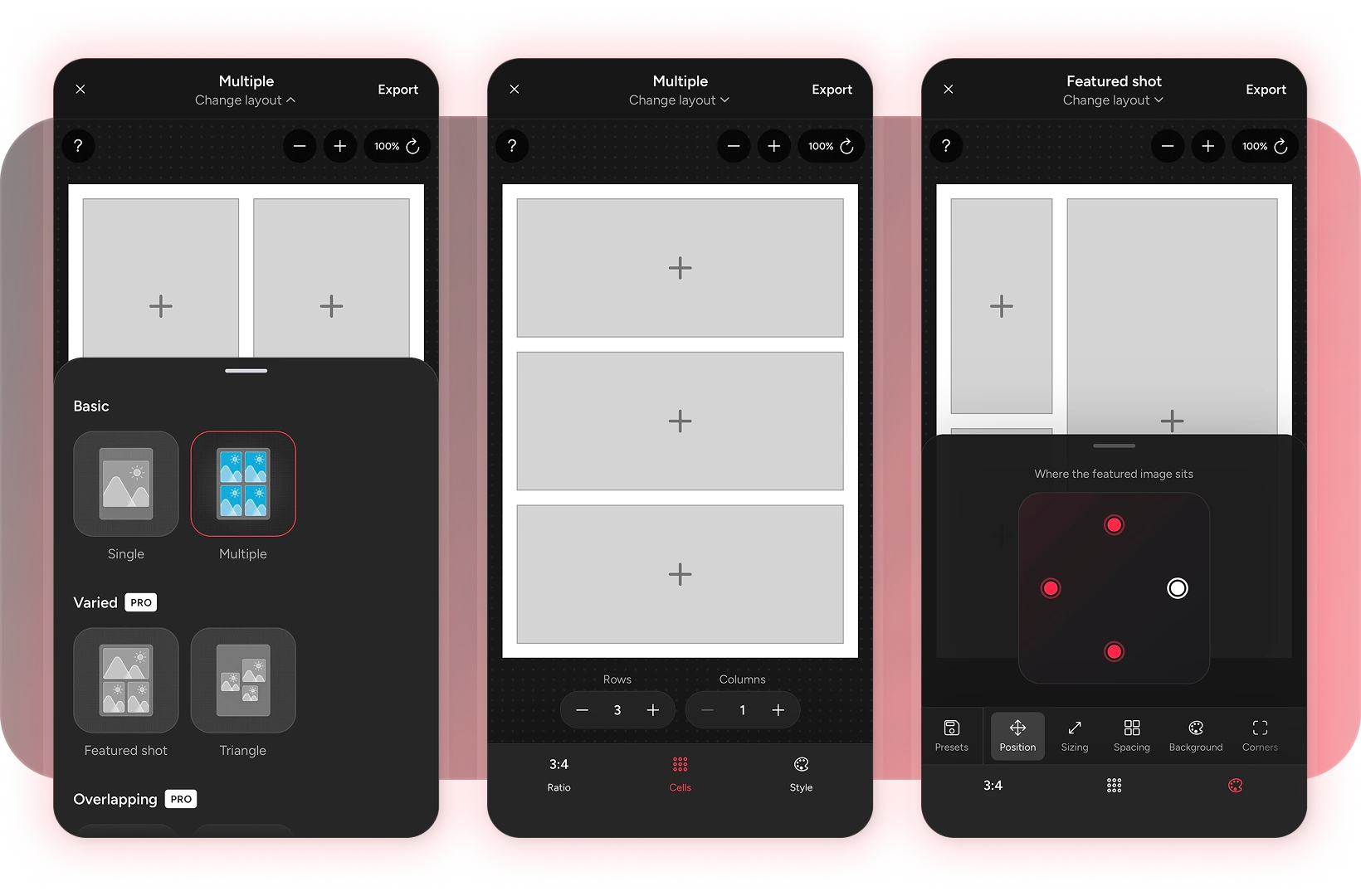
Overview
This update is HUGE!
It contains a whole new action on the home screen, a brand new template in Info frames (previously known as Image maker), updated toolbars and a completely revamped style toolbar, a more intuitive way to select, crop and reposition your images, a new export screen and finally, several improvements and behind-the-scenes maintenance. 😮💨
Sorry it's taken so long to come out. I hit a few roadblocks along the way (especially with performance), and I had a few life things going on that meant I didn't have the time to work on it, and I didn't want to release it until I was happy with how it was all working.
I can't wait to see what you make with the new Layout maker, and I'd love to hear your feedback on the updated UI. ✌️
Check out the full list of updates below.
Updates
- Layout maker: easily create grids and unique layouts with multiple images or videos.
- Renamed Image maker to Info frames: To reflect more clearly what this action does, I've renamed it to Info frames. This is where all the templates that show details will live.
- New Polaroid template: As I moved the "Border" template into the Layout maker, I wanted to add a new template for you in Info frames. The new Polaroid template shows details underneath your image, and can even show your camera brand logo if it's available in the app.
- Updated toolbars: The style toolbar got a huge update. I wanted to make it easier to switch between styles so you didn't have to keep closing them all the time. I also made it so the main toolbar condenses when a secondary toolbar is open.
- A new way to crop, reposition, and resize images: I've made it more intuitive to edit the position of your images. Simply tap the image to select it, and then you can scale or move it as you wish. Tap it again to deselect it.
- A new image selection toolbar: When the image is selected, a new toolbar will appear.
- You can change the sizing of the image from cover (where it fills the cell) to fit (where it will be able to move freely inside the cell). I've also added this to the Video maker which can be very helpful if you want to see the full image within a different aspect ratio, and then zoom into it.
- You can now do basic edits on an image or video, useful to help make your content match each other better visually.
- You can replace the image from here.
- You can delete the image from your layout entirely.
- Updated style options: I've rejigged some of the style options to (hopefully) make more sense. This includes updating some of the icons too. Spacing adjusts the spacing around or between your images. Border replaces the previous "Keyline" option. Background adjusts the colour between and around your images.
- Watermark control inside styles: The watermark can now be toggled on or off inside all editors. You can find this button in the style toolbar.
- New gradients for the background colours: I just fancied adding some more. 🤷♂️
- Release notes: Yeah, this whole thing you're reading right now, can be read inside the app. Helpful when the app updates and you want to see what's new.
- A new export screen: All editors share a new export screen that shows you the progress, and has helpful Photospec tags to help share your images with us!
- More consistent zoom controls: I've updated the zoom controls so they're more consistent across the editors. Reset zoom now returns to the same position, and the + and − buttons move in 10% increments (I've no idea what random values it used before).
- Original ratio for carousels: If you plan on posting your full image in its original aspect ratio, then you probably need the carousel slides to also use the original aspect ratio. This is now the default, as in all the other editors.
- Photo location control: With Pro, in the Info frames action, if your image has GPS coordinates, the app sends them to Google Places API to automatically look up a location and populate the location detail for you. If you don't want the app to do this, you can now toggle this setting off in the settings.
- Plants and fungi now in the species search: It was missing before and caused other issues with results not appearing. Closer matching names should now appear higher up the list too.
- Imported images now use sRGB: Previously, the app kept whatever colour profile your images were exported with, which caused some odd colour issues. To be consistent across the majority of screens, the app now converts images to sRGB on import and export.
- Several memory and performance improvements: Many hours were spent investigating some performance bugs that I noticed. Hopefully they're all squished, but let me know if you still have any issues!
- Keyboard improvements: You can now tap "Return to editor" without the keyboard re-opening every time.
- Exported images have timestamps: I noticed Google wasn't showing me multiple images if it detected them as duplicates. The app now exports images with timestamps to let devices know it's a new image.